

You're on a client call from a rented apartment in rural Portugal, and the cellular signal drops to one bar. The call fails. You redial three times. The client stops responding. This is exactly why wifi calling matters for digital nomad connectivity, yet most nomads treat it as an afterthought rather than a professional lifeline. WiFi calling is not a workaround. It is a carrier-grade voice service that runs over your internet connection, uses your real phone number, and keeps you reachable when cellular networks let you down.
Table of Contents
- Key takeaways
- What WiFi calling actually is and how it works
- Why WiFi calling is critical for nomads and remote workers
- Pitfalls and practical limitations to know
- How WiFi calling compares to other nomad communication options
- Setting up and optimizing WiFi calling
- My honest take on WiFi calling for nomads
- How Eisim takes your connectivity further
- FAQ
Key takeaways
| Point | Details |
|---|---|
| WiFi calling is carrier-integrated | It routes calls through your carrier's core network, not a third-party app, preserving your phone number and caller ID. |
| Call success rates improve dramatically | WiFi calling can improve call success by up to 90% in low-coverage areas compared to cellular-only connections. |
| Emergency address must be updated manually | Relocating without updating your E911 address can send emergency responders to your old location. |
| Cost savings are built in | Most standard mobile plans include WiFi calling at no extra charge, avoiding international roaming fees. |
| It works best as part of a broader toolkit | Pairing WiFi calling with eSIM data gives nomads both voice reliability and flexible data coverage worldwide. |
What WiFi calling actually is and how it works
WiFi calling, technically called VoWiFi (Voice over WiFi), routes your phone calls through a WiFi network to your mobile carrier's core infrastructure. Your phone's native dialer handles the call exactly as it would over cellular. You do not need a separate app, a new account, or a different phone number.
The key distinction from apps like WhatsApp or Skype is significant. Third-party VoIP apps require both parties to use the same platform, and they display app-assigned numbers or usernames rather than your real phone number. WiFi calling uses your existing mobile number, which means anyone can call you normally and your caller ID shows up as expected on the other end.
Security is another area where WiFi calling stands apart. Carrier-encrypted IPsec tunnels route your voice traffic directly to your carrier's network, protecting communication over public WiFi hotspots in cafes, airports, and coworking spaces. You are not relying on the security practices of a third-party app server.
One of the most practical features is seamless handover. Modern smartphones switch calls between WiFi and cellular mid-call without dropping the connection. Walk out of a building with strong WiFi into a street with decent cellular coverage, and your call continues uninterrupted.
- VoWiFi uses your native phone dialer, not a separate app
- Your phone number and caller ID remain unchanged, protecting professional credibility
- Calls are encrypted end-to-end through your carrier's secure tunnel
- Handover technology transitions calls between networks without interruption
Pro Tip: Carriers invest in VoWiFi as a core cloud-native voice technology, meaning it carries the same reliability standards as cellular voice, not the unpredictability of consumer VoIP apps.
Why WiFi calling is critical for nomads and remote workers
The importance of wifi calling becomes clear the moment you work from locations where cellular coverage is inconsistent. Rural coworking spaces, mountain towns, island accommodations, and older urban buildings with thick walls all share one problem: weak cellular signal. WiFi calling solves this without requiring you to change your number, switch carriers, or install new software.

WiFi calling improves call success rates by up to 90% in rural or low-coverage areas compared to relying solely on cellular. That number is not a minor improvement. It is the difference between a functional workday and a day of missed client calls and rescheduled meetings.
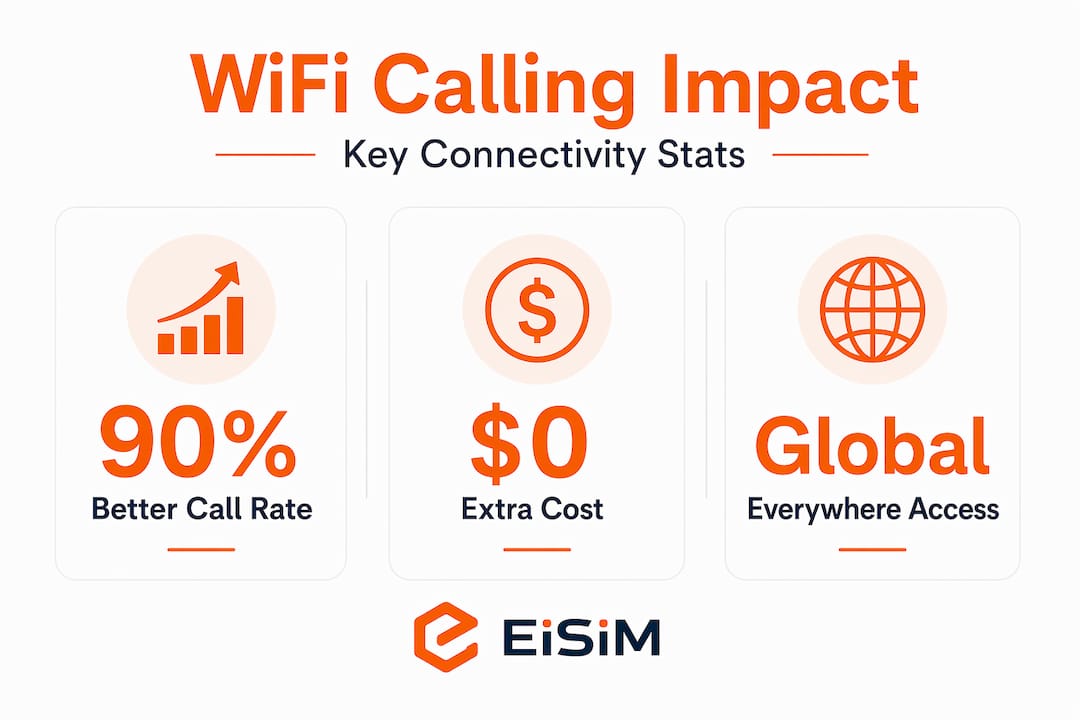
Cost control is another major benefit. Most mobile plans include WiFi calling at no additional charge, and calls made over WiFi to domestic numbers do not trigger international roaming fees. If you are based in Germany for a month and need to call your U.S. clients on their regular numbers, WiFi calling over a local internet connection can eliminate those roaming costs entirely, depending on your carrier's policy.
Voice quality is also frequently better over a stable WiFi connection than over a weak cellular signal. WiFi calling on stable connections often delivers superior voice quality compared to weak cellular networks, which is a fact many nomads discover only after they start using it consistently.
There is also a battery benefit that rarely gets mentioned. WiFi calling reduces battery drain because your phone stops burning power searching for a weak cellular signal. For a nomad working a full day from a location with poor coverage, that difference can add hours to your device's battery life.
- Up to 90% improvement in call success rates in low-coverage areas
- No extra cost on most standard mobile plans for domestic calls over WiFi
- Eliminates roaming charges when calling home from abroad over local WiFi
- Better voice quality on stable WiFi versus a weak cellular connection
- Extended battery life by reducing power-intensive cellular radio activity
Connectivity experts regard WiFi calling as a non-negotiable safety net for maintaining professional phone connectivity when cellular networks fail. That framing is accurate. Reliable communication is not optional for remote workers. It is the foundation of client trust and professional credibility.
Pitfalls and practical limitations to know
Understanding the benefits of wifi calling is only half the picture. There are real pitfalls that can catch nomads off guard, and knowing them in advance is what separates a smooth experience from a serious problem.
The most critical issue is emergency calling. Failing to update your registered E911 address can cause emergency responders to be dispatched to your previous location, not where you actually are. Unlike cellular calls, which use tower triangulation to approximate your location, WiFi calling relies entirely on the address you manually registered with your carrier. Every time you move to a new city or country, you need to log into your carrier account and update that address.
Pro Tip: Set a calendar reminder to update your emergency address on the same day you check into a new location. Treat it as part of your arrival checklist, alongside connecting to WiFi and confirming your accommodation address.
Call quality problems over WiFi are almost always caused by network jitter and packet loss, not by a lack of bandwidth. Network jitter disrupts voice packet timing, causing robotic audio or choppy speech even when your speed test looks fine. Switching to a 5 GHz WiFi band, using wired headphones, and closing bandwidth-heavy applications during calls will resolve most quality issues.
There are also compatibility considerations worth knowing:
- Some eSIMs do not support WiFi calling depending on the carrier and device combination. Check compatibility before relying on it.
- VPNs can interfere with WiFi calling because they reroute traffic in ways that conflict with the carrier's IPsec tunnel. Disable your VPN before making calls if you experience issues.
- Carrier policies vary internationally. Some carriers restrict WiFi calling to domestic use only, meaning it will not work for calls made while abroad even over WiFi. Verify your carrier's roaming WiFi calling policy before travel.
- Turn off WiFi calling when you are connected to a congested public network with high packet loss, such as a busy hotel lobby. In those cases, cellular may deliver better quality.
QoS settings on routers that prioritize voice packets using WiFi Multimedia (WMM) can significantly improve call stability. If you are staying somewhere long-term, it is worth checking whether the router supports this setting.
How WiFi calling compares to other nomad communication options
WiFi calling does not replace every communication tool in your kit. Understanding where it fits relative to other options helps you make smarter decisions about when to use each one.
| Method | Best for | Limitations |
|---|---|---|
| WiFi calling | Calls using your real number over WiFi | Requires carrier support; E911 address management needed |
| Cellular voice / VoLTE | Strong signal areas with reliable coverage | Fails in low-coverage zones; roaming charges apply |
| VoIP apps (e.g., WhatsApp) | Calls to contacts on the same platform | Requires app on both ends; caller ID differs from your phone number |
| eSIM data | Flexible data coverage across countries | Voice calls still need WiFi calling or a separate voice plan |
The most practical setup for connectivity for remote workers combines an eSIM for local data access with WiFi calling for voice. Your eSIM gives you mobile data in the country you are in without swapping physical SIMs. Your WiFi calling uses that data connection or any available WiFi to route calls through your home carrier, keeping your number consistent for clients and contacts.
VoIP apps like WhatsApp are useful for international calls to contacts who also use the platform. But they require the other person to have the app, and your caller ID shows as an app username rather than your phone number. For professional calls to clients, vendors, or anyone outside your personal network, WiFi calling is the more credible option.
Human-centric communication tools that combine data and voice seamlessly are increasingly the standard for mobile professionals who need both flexibility and reliability.
Setting up and optimizing WiFi calling
Getting WiFi calling configured correctly takes about five minutes, but the details matter.
- Enable WiFi calling on your device. On iPhone, go to Settings > Phone > WiFi Calling and toggle it on. On Android, the path varies by manufacturer but is typically found under Settings > Connections > WiFi Calling or within your Phone app settings.
- Register your emergency address. Your carrier will prompt you during setup. Complete this step accurately and update it every time you relocate.
- Test the connection before a critical call. Make a short test call to confirm audio quality. If it sounds robotic or choppy, switch to the 5 GHz band on your router or move closer to the access point.
- Disable your VPN before calls. If you use a VPN for privacy, turn it off before making WiFi calls to avoid tunnel conflicts with your carrier's IPsec connection.
- Monitor quality and switch when needed. If a WiFi network is too congested, turn off WiFi calling temporarily and let your phone fall back to cellular.
Pro Tip: On iPhone, you can set your preferred call mode to "WiFi Preferred" or "Cellular Preferred" under Settings > Phone > WiFi Calling. Set it to "WiFi Preferred" when you are in a location with strong WiFi and weak cellular, and switch back when you are in a city with solid 4G or 5G coverage.
For long-term stays, ask your accommodation host about their router settings. A router with WMM enabled and a clean 5 GHz band will make a noticeable difference in call clarity during video and voice calls throughout your workday.
My honest take on WiFi calling for nomads
I have watched a lot of remote workers build elaborate connectivity setups with multiple SIMs, backup hotspots, and VoIP accounts, and then drop an important client call because they never turned on WiFi calling. It is consistently the most overlooked tool in the nomad communication stack.
The emergency address issue is the one that concerns me most. Most nomads I know have never updated their E911 address after their first setup. They are registered at an address in their home country that they have not lived at in years. That is not a minor administrative oversight. It is a real safety risk.
What changed my own communication reliability was pairing eSIM data with WiFi calling. The eSIM gives me local data in whatever country I am in, and WiFi calling uses that connection to route calls through my home carrier number. Clients call my regular number. I answer. No confusion, no app requirements, no explaining why my caller ID looks unfamiliar.
The trade-off worth acknowledging is that WiFi calling is only as good as the WiFi network you are on. A congested hotel network can make it worse than cellular. You need to develop the habit of quickly assessing your network quality before important calls and switching modes when necessary.
Treat WiFi calling as a core professional tool, not a fallback. The future of communication for globally mobile professionals depends on integrating these tools deliberately, not accidentally.
— John
How Eisim takes your connectivity further
WiFi calling solves the voice reliability problem. But connectivity for remote workers goes beyond a single call. Managing voice, data, and messaging across multiple tools and platforms creates friction that costs time and focus every day.
Eisim addresses this directly. Through its unified domain communication platform, Eisim integrates voice, video, and messaging into a single interface, removing the need to juggle multiple apps and accounts. Remote teams and freelancers report reduced operational costs and faster communication when they consolidate their tools through Eisim. If you are already optimizing your WiFi calling setup, pairing it with Eisim's global communication solutions is the logical next step toward full connectivity control.
FAQ
What is WiFi calling and how does it differ from WhatsApp?
WiFi calling routes calls through your carrier's core network using your real phone number, while WhatsApp requires both parties to use the app and displays an app-based identity rather than your mobile number.
Does WiFi calling cost extra on standard mobile plans?
Most standard mobile plans include WiFi calling at no additional charge, and domestic calls made over WiFi typically do not trigger roaming fees when you are abroad.
Why do I need to update my emergency address for WiFi calling?
WiFi calling does not use cell tower triangulation to determine your location, so emergency responders rely entirely on the address you manually registered with your carrier. Failing to update it when you relocate can send help to the wrong place.
Can WiFi calling work with an eSIM?
WiFi calling compatibility with eSIMs depends on your carrier and device. Some eSIM providers support it fully, while others do not. Always verify compatibility with your specific carrier before relying on it as your primary voice method.
What should I do if my WiFi call quality is poor?
Switch to the 5 GHz WiFi band, disable your VPN, close bandwidth-heavy apps, and use wired headphones. If the network is too congested, turn off WiFi calling and fall back to cellular for that call.
Recommended
- A New Era in Global Communication – EiSIM Unified Domain Communication’s
- The Value of Face-to-Face Meetings in the EiSIM Beyond 5G Era – EiSIM Unified Domain Communication’s
- EiSIM: Transform Communication with Your Domain Name – EiSIM Unified Domain Communication’s
- Connecting Businesses Globally with EiSIM GEO – EiSIM Unified Domain Communication’s