

You open your laptop at a Lisbon café, connect to the free Wi-Fi, and get to work. It feels routine. But that same network may already be logging your credentials, redirecting your DNS queries, or feeding you a fake captive portal. Secure communications on public Wi-Fi for nomads is not a nice-to-have. It is a daily operational requirement. This guide covers the real threats you face, the exact steps to neutralize them, and the habits that separate nomads who stay protected from those who find out the hard way.
Table of Contents
- Key takeaways
- Understanding the risks of public Wi-Fi for nomads
- Preparation before connecting to public Wi-Fi
- Step-by-step guide to securing your session on public Wi-Fi
- Common pitfalls when securing communications on public Wi-Fi
- Verifying your connection and post-session best practices
- My take on the future of nomad Wi-Fi security
- How Eisim supports secure nomad connectivity
- FAQ
Key takeaways
| Point | Details |
|---|---|
| Most public Wi-Fi is unencrypted | 87% of public hotspots lack WPA3 or TLS enforcement, exposing your traffic by default. |
| Disable auto-join before you travel | Turning off automatic connection cuts MITM attack success rates from 68% to under 5%. |
| VPN is necessary but not sufficient | A VPN encrypts traffic in transit but does not protect against endpoint threats or session hijacking. |
| Verify every network name with staff | Evil twin hotspots are a primary attack vector against digital nomads in hotels and cafés. |
| Cellular data beats public Wi-Fi for sensitive work | Carrier encryption makes mobile hotspots inherently safer for logins, payments, and client calls. |
Understanding the risks of public Wi-Fi for nomads
Most digital nomads know public Wi-Fi carries some risk. Few understand exactly how that risk works. The gap between knowing and understanding is where attackers live.
The core problem is encryption. 87% of public hotspots lack WPA3 encryption or TLS enforcement, which means your traffic travels in a form that anyone on the same network can intercept with freely available tools. You do not need to be a sophisticated attacker. A $30 Wi-Fi adapter and a free packet capture application are enough.
Beyond passive interception, several active attacks target nomads specifically:
- Evil twin networks. Attackers broadcast a network with the same name as the legitimate hotspot. Your device connects automatically, and all traffic routes through the attacker's hardware.
- ARP spoofing. 63% of public Wi-Fi networks permit ARP spoofing by default, allowing attackers to position themselves between your device and the router and redirect your traffic silently.
- DNS hijacking. Your device asks for a website's IP address. On a compromised network, that query gets answered with a malicious IP instead, sending you to a convincing fake site.
- Fake captive portals. You connect to what looks like the café's login page. You enter your email and a password. That password now belongs to someone else.
Session hijacking is a particular threat that many nomads underestimate. Even when a site uses HTTPS, session cookies transmitted over a compromised network can be captured and replayed. The attacker does not need your password. They just need your session token. And credential theft bypasses even 2FA in 58% of compromised accounts through exactly this mechanism.
Hotel Wi-Fi deserves special mention. The DarkHotel APT group has targeted business travelers via hotel Wi-Fi since at least 2007, injecting malware through seemingly legitimate network update prompts. If you are working from a hotel, treat that connection with the same suspicion you would give an airport terminal.
Preparation before connecting to public Wi-Fi
Security on public Wi-Fi starts before you open the laptop. The decisions you make during setup determine how exposed you are the moment you connect.
Follow these steps to prepare your device and tools:
-
Disable auto-join for all saved networks. On iOS, toggle "Auto-Join" off for every public network. On Windows, uncheck "Connect automatically" before joining. Disabling auto-join cuts MITM attack success rates from 68% to 4.7%. That single setting change is one of the highest-impact actions you can take.
-
Configure DNS over HTTPS or DNS over TLS. Both protocols encrypt your DNS queries so attackers on the same network cannot see or manipulate what sites you are looking up. Configuring DoH or DoT on your device or router significantly reduces DNS spoofing risk. In Chrome, go to Settings > Privacy and Security > Security and enable "Use secure DNS." Firefox has a similar toggle under Network Settings.
-
Install and configure a VPN with a kill switch. Choose a VPN provider that supports a kill switch. This feature cuts your internet connection entirely if the VPN tunnel drops, preventing your traffic from leaking onto the unprotected network. Enable the kill switch before you ever connect to a public hotspot.
-
Keep your OS, browser, and VPN app updated. Outdated software is one of the most common entry points for attackers. Updates patch known vulnerabilities. Run them before a trip, not during.
-
Create an isolated browser profile for public Wi-Fi sessions. Most major browsers support multiple profiles. A dedicated profile with no saved passwords, no extensions that access your accounts, and no persistent cookies limits the damage if something goes wrong.
-
Forget public networks after each session. If your device remembers a network, it will probe for it again later. Forget every public network immediately after use.
Pro Tip: For any task involving client data, financial accounts, or confidential communications, skip public Wi-Fi entirely. Experts recommend cellular data over public Wi-Fi for sensitive transactions because carrier encryption is enabled by default and the network is not shared with strangers.
Step-by-step guide to securing your session on public Wi-Fi
Preparation sets the foundation. What you do during a session determines whether that foundation holds. Here is the exact sequence to follow every time you connect to a public network.
Step 1: Verify the network name before connecting. Ask a staff member for the exact SSID. Do not rely on what appears in your device's network list. Evil twin hotspots are frequently used by attackers targeting digital nomads, and the fake network will often appear stronger than the real one.
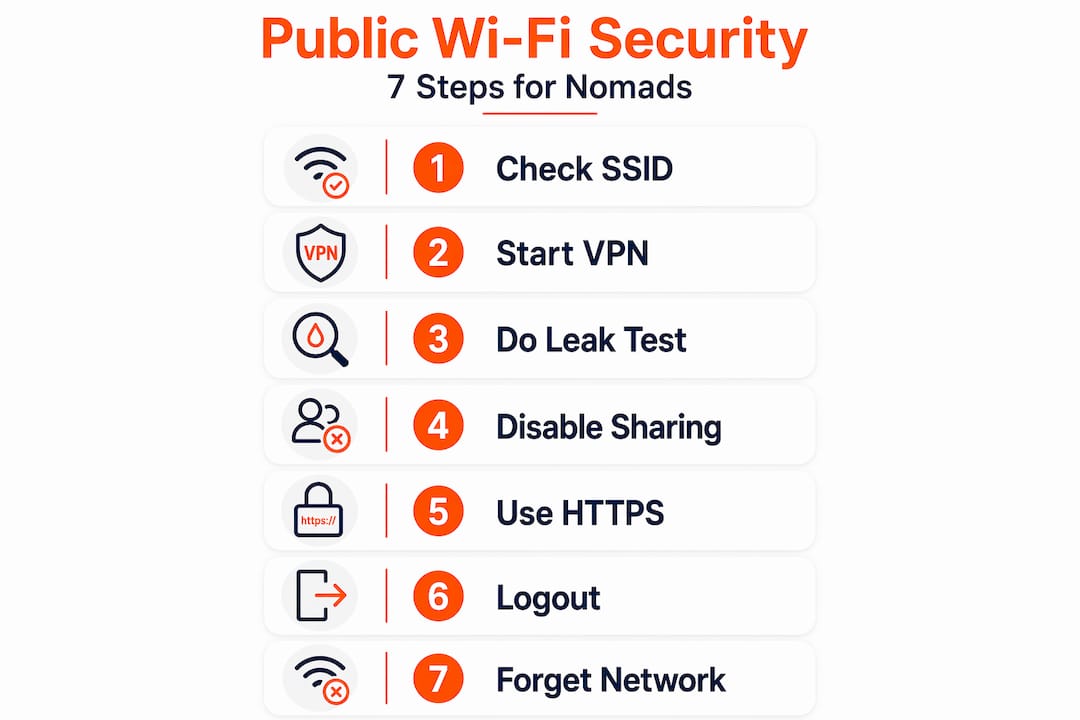
Step 2: Connect your VPN before opening any app or browser. The moment your device joins the network, it begins communicating. If your VPN is not active before that first packet leaves your machine, your real IP address and device fingerprint are already visible. Enable VPN first. Then browse.

Step 3: Run a quick leak check. Visit a DNS leak test site and confirm your VPN's IP address appears, not your real one. DNS and IPv6 leaks compromise VPN tunnel integrity even when the VPN appears connected. If you see your real IP or ISP in the results, disconnect and troubleshoot before continuing.
Step 4: Disable Bluetooth and file sharing. Both expand your attack surface unnecessarily. Bluetooth can be exploited for device pairing attacks. File sharing exposes directories to others on the same network segment.
Step 5: Use HTTPS-only mode in your browser. Modern browsers offer an HTTPS-only mode that blocks connections to sites without valid certificates. Enable it. If a site you normally trust suddenly shows a certificate error, do not click through. That warning is the network telling you something is wrong.
Step 6: Log out and clear session data before disconnecting. Do not just close the browser tab. Log out of every site you accessed. Then clear cookies and cache for that session. Post-session credential leakage increases 4.1x when session data is not cleared immediately after disconnecting.
Step 7: Forget the network and disable Wi-Fi when done. Once you leave the location, forget the network and turn Wi-Fi off. Your device will stop probing for it and will not auto-connect if you pass by again.
| Action | When to do it | Risk mitigated |
|---|---|---|
| Enable VPN with kill switch | Before connecting | Traffic interception, IP exposure |
| Verify SSID with staff | Before connecting | Evil twin attacks |
| Run DNS/IP leak test | After VPN connects | VPN tunnel failures |
| Disable Bluetooth and sharing | During session | Device pairing and file access attacks |
| Clear cookies and log out | Before disconnecting | Post-session credential theft |
| Forget network | Immediately after leaving | Auto-reconnect to rogue networks |
Pro Tip: If your VPN provider supports split tunneling, disable it on public Wi-Fi. Split tunneling routes some traffic outside the VPN tunnel, and on a hostile network, that unprotected traffic is exactly what attackers are waiting for.
Common pitfalls when securing communications on public Wi-Fi
Knowing the steps is one thing. Avoiding the mistakes that undercut them is another. These are the errors that compromise nomads who think they are already protected.
-
Treating VPN as a complete solution. A VPN encrypts your traffic between your device and the VPN server. It does nothing to protect against malware already on your device, stolen session cookies, or phishing attacks. VPN credentials were the initial attack vector in 48% of ransomware attacks in Q3 2025. The VPN itself became the vulnerability.
-
Clicking through certificate errors. When your browser warns you that a site's certificate is invalid, that is not a nuisance. It is a signal that someone may be intercepting your connection and presenting a fraudulent certificate. Clicking through hands your session to whoever is in the middle.
-
Ignoring IPv6 leaks. Many VPNs handle IPv4 traffic correctly but leave IPv6 unprotected. If your device has an IPv6 address and your VPN does not tunnel it, your real location and identity leak out. Check your VPN settings and disable IPv6 at the operating system level if your VPN does not support it.
-
Falling for captive portal phishing. Fake captive portals mimic legitimate hotel or café login pages. They may ask for your email, room number, or even payment details. Look at the URL in your browser before entering anything. A legitimate captive portal will not ask for your banking credentials.
-
Relying on auto-reconnect. If you leave a network's range and return, your device may reconnect automatically to whichever network broadcasts that SSID first. That could be the legitimate network or an evil twin that appeared while you were away.
"A layered security approach, including endpoint hygiene, network verification, and use of cellular data for sensitive communications, is more reliable than any single tool." Public WiFi Safety Guide (2026)
Verifying your connection and post-session best practices
After you have taken all the right steps during a session, verification closes the loop. These habits confirm your protections worked and reduce residual risk.
-
Run a DNS leak test immediately after VPN activation. Use a site like dnsleaktest.com. Confirm that only your VPN provider's DNS servers appear in the results. If your ISP's servers show up, your DNS queries are leaking outside the tunnel.
-
Check HTTPS certificate details on critical sites. Click the padlock icon next to the URL and inspect the certificate. Verify that the issuing authority matches what you expect. A certificate issued by an unknown authority on a site you use daily is a red flag.
-
Clear cookies, cache, and site data after every public Wi-Fi session. Do this even if you already logged out. Session tokens can persist in cookies and be reused by anyone who captures them. Credential theft often stems from session hijacking enabled by session cookies transmitted over unencrypted channels.
-
Enable phishing-resistant multi-factor authentication on all critical accounts. Standard SMS-based 2FA can be bypassed through session hijacking. Hardware security keys and passkeys bound to managed devices provide phishing-resistant MFA that holds up even when an attacker has your password.
-
Audit your device security posture regularly. Check for software updates, review which apps have network access, and confirm your firewall is active. Security is not a one-time configuration. It requires ongoing attention.
Pro Tip: When you are not actively using Wi-Fi, turn off your device's Wi-Fi radio entirely. Passive scanning for known networks broadcasts your device's history of previously connected SSIDs, which attackers can use to create targeted evil twin networks.
My take on the future of nomad Wi-Fi security
I have watched the security conversation among digital nomads evolve significantly over the past several years. For a long time, "get a VPN" was the beginning and end of the advice. I think that framing has become genuinely dangerous.
The rise of Zero Trust Network Access represents a fundamental shift in how security should work for remote professionals. ZTNA is emerging as the preferred paradigm for remote work security, built on continuous verification rather than assumed network-level trust. In practice, that means your device and identity are verified at every access request, not just at login. A compromised network becomes far less useful to an attacker when the applications themselves refuse to trust it.
What I have seen repeatedly in practice is that nomads underestimate endpoint risk. They lock down their network connection and then use an unpatched browser, reuse passwords across accounts, or ignore certificate warnings because they are in a hurry. The network layer is only one part of the picture.
My honest recommendation: treat cellular data as your primary channel for anything sensitive. Reserve public Wi-Fi for low-stakes browsing. When you must use it for real work, the layered approach described in this guide is not optional. It is the minimum viable posture. Tools like those offered by Eisim are pushing in exactly the right direction, integrating voice, video, and messaging into unified, controllable platforms that reduce your dependence on whatever network happens to be available.
The nomadic lifestyle does not have to mean accepting elevated risk. It means being more deliberate about security than someone sitting behind a corporate firewall.
— John
How Eisim supports secure nomad connectivity
Digital nomads face a real tension: the need to stay connected across borders and time zones, and the need to keep that connectivity secure. Public Wi-Fi is often the only option available, and the risks are real.
Eisim addresses this directly. Its unified domain communication platform integrates voice, video, and messaging into a single interface, reducing the number of apps and networks you depend on at any given moment. Fewer connection points mean fewer vulnerabilities. Remote workers and freelancers who consolidate their communications through Eisim report lower operational complexity and greater confidence in their secure communication setup. The platform is built for professionals who cannot afford downtime or data exposure, whether they are working from a co-working space in Bangkok or a hotel lobby in Berlin. If you are ready to move beyond patching together multiple tools and toward a unified, security-conscious communication foundation, explore what Eisim offers at eisim.net/services.
FAQ
What makes public Wi-Fi dangerous for digital nomads?
Most public hotspots lack modern encryption, and 87% lack WPA3 or TLS enforcement, leaving traffic exposed to interception, ARP spoofing, and DNS hijacking by anyone on the same network.
Is a VPN enough to stay safe on public Wi-Fi?
No. A VPN encrypts traffic in transit but does not protect against endpoint threats, session hijacking, or credential theft. A layered approach that includes endpoint hygiene, phishing-resistant MFA, and network verification is required.
How do I know if my VPN is actually working correctly?
Run a DNS leak test immediately after connecting. If your ISP's DNS servers appear in the results instead of your VPN provider's, your tunnel has a leak and your queries are exposed.
What is the safest alternative to public Wi-Fi for sensitive work?
Experts recommend cellular data over public Wi-Fi for sensitive transactions because carrier encryption is on by default and the network is not shared with other users.
How does session hijacking bypass two-factor authentication?
Attackers capture your session cookie after you authenticate, then replay it to impersonate you without needing your password or 2FA code. Clearing session data immediately after each session and using phishing-resistant MFA significantly reduces this risk.