

Every startup hits the same wall: your team is spread across five different tools, nobody sees the same information at the same time, and critical decisions get buried in the wrong channel. If you need to integrate communication tools into your startup tech stack and don't know where to start, you're not alone. Fragmented communication costs real productivity. One study found that context switching between apps can account for more than a third of a developer's working day. This guide walks you through assessment, tool selection, step-by-step integration, and advanced automation so your stack actually works as one.
Table of Contents
- Key Takeaways
- How to integrate communication tools into your startup tech stack
- Choosing the right communication tools for integration
- Step-by-step guide to connecting your tools
- Troubleshooting and validating your integrations
- Advanced strategies for AI-powered communication
- My honest take on integration mistakes startups make
- How EiSIM empowers startups to unify their communication stack
- FAQ
Key Takeaways
| Point | Details |
|---|---|
| Audit before you build | Map your existing tools, workflows, and pain points before adding any new integration layer. |
| API support is non-negotiable | Only commit to communication platforms that offer strong API and webhook support from day one. |
| Start simple, then iterate | Connect the highest-pain manual handoff first, then add complexity as your team grows. |
| OAuth scopes break integrations | Incorrect or missing OAuth scopes are the most common cause of failed Slack and tool integrations. |
| AI is the next integration layer | MCP-based AI connectors and AI-powered search are making knowledge discovery a core integration use case. |
How to integrate communication tools into your startup tech stack
Before you write a single line of integration code or flip a single toggle in a third-party platform, you need to understand what you actually have. Most startups accumulate tools reactively. Slack gets added for messaging. A project management tool gets added for tasks. A CRM, a support desk, a video call platform. Each one solves one problem, and none of them talk to each other.
Start with a communication workflow audit. Answer these four questions honestly:
- Which tools does your team actually use daily, versus tools that are technically "in the stack" but rarely opened?
- Where do handoffs happen manually? Think about Slack messages that summarize a GitHub PR, or a support ticket that gets copy-pasted into a team channel.
- Which tools expose APIs or webhooks? Check each vendor's documentation for available endpoints, rate limits, and authentication methods.
- What are your security and data governance requirements? Some integrations move data between cloud services; others need to stay within your own infrastructure.
Once you've answered those questions, set specific integration objectives. Do you want automated notifications from your code repository to your team channel? Do you want your BI dashboards to send scheduled snapshots to stakeholders? Do you want AI-powered search across your knowledge base and messaging platform? Each of these objectives requires a different integration pattern, and conflating them early is how complexity spirals.
Pro Tip: Build a simple spreadsheet with four columns: Tool Name, API Available (Yes/No), Webhook Support (Yes/No), and Current Manual Workaround. This becomes your integration priority list. The rows with "Yes/Yes" and a painful manual workaround are where you start.
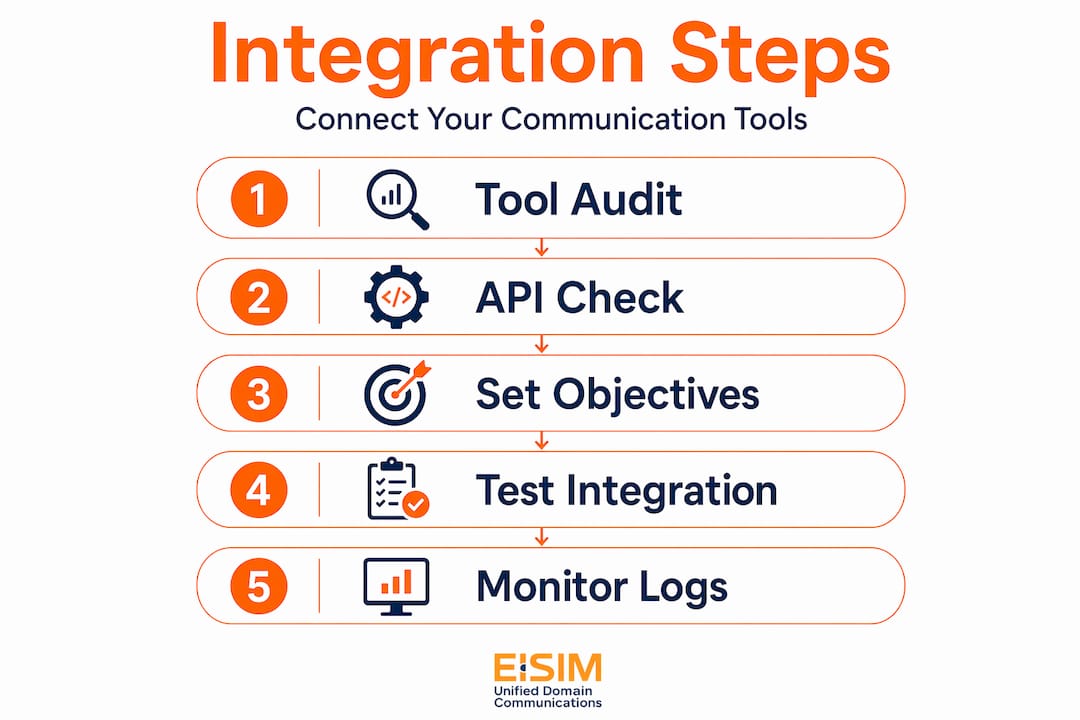
Seed-stage startups should avoid proprietary platforms without APIs entirely, and prioritize tools with strong API support as a selection criterion before signing any contract.
Choosing the right communication tools for integration
Choosing communication platforms for startups is not the same as choosing the most feature-rich tools. The right question is: which tools integrate well with everything else you already run?
Here is a comparative overview of the communication tools most commonly used in tech startup stacks and their integration characteristics:
| Tool | API/Webhook Support | Native Integrations | Best For |
|---|---|---|---|
| Slack | Extensive API, Events API, Webhooks | 2,500+ apps | Team messaging, notifications, AI search |
| Google Workspace | Full REST APIs | Gmail, Drive, Meet, Calendar | Email, docs, scheduling |
| GitHub | Webhooks, REST, GraphQL APIs | Slack, Jira, CI/CD tools | Code collaboration, PR workflows |
| Aircall | REST API, native CRM/helpdesk sync | 250+ integrations, AI transcription | Voice and SMS communication |
| Zoom | REST API, webhooks | Slack, calendar tools, CRMs | Video calls, webinars |
When evaluating any tool for your tech stack for communication tools, prioritize these criteria in order:
- API depth: Can you read and write data, trigger actions, and receive real-time events?
- Webhook reliability: Does the platform send reliable outbound events when something changes?
- Authentication standard: Does it use OAuth 2.0? This matters for secure, maintainable integrations.
- Native integration catalog: A platform with 250+ pre-built integrations means less custom code.
Aircall offers over 250 native integrations plus AI features including transcription, sentiment analysis, and automated summaries, which reduces the manual labor of logging calls across your CRM and support tools. For startups handling customer communication at volume, that kind of data centralization is significant.
The emerging standard to pay attention to is the Model Context Protocol (MCP). MCP is an open standard that allows AI models to connect to multiple external tools using one connector per tool, reducing integration complexity across your entire AI layer. If you are planning to add AI capabilities to your communication stack, building around MCP-compatible tools now saves substantial engineering work later.
Step-by-step guide to connecting your tools
Once you've selected your tools, here is how to actually connect them. The example below follows one of the most common startup integration patterns: connecting a data or analytics platform to Slack for automated reporting.
-
Create a Slack app. Go to api.slack.com/apps and create a new app for your workspace. Give it a descriptive name so your team knows what it does.
-
Configure OAuth scopes. This step trips up most teams. Setting up Slack notifications requires adding specific scopes including "incoming-webhook
andchat:write` before the app can post to any channel. Missing a required scope means the integration will appear to install correctly but will silently fail at runtime. -
Install the app to your workspace. Once scopes are set, install the app and authorize it. Copy the OAuth token and store it securely in your secrets manager, not in your codebase.
-
Configure the destination channel. Invite the app to the specific Slack channel where notifications should appear. Many teams forget this step and wonder why messages are not arriving.
-
Connect your source tool. In Databricks, for example, you configure the Slack app credentials under the notification settings and specify channel destinations and schedules for dashboard snapshots.
-
Set up GitHub scheduled reminders. GitHub's pull request reminders can be sent directly to Slack channels on a schedule, filtered by repository and team. You set the Slack authorization, choose the channel, configure the timezone, and select which repositories to track.
-
Build automation flows with no-code tools. For integrations between tools that don't share native connectors, platforms like Zapier or Make.com let you build automation flows without writing code. Connect a trigger in one app to an action in another, and test each step before activating.
Pro Tip: Always test integrations in a dedicated test Slack channel before routing notifications to a live team channel. This protects your team from alert noise during setup and gives you a clean space to verify payloads.
Troubleshooting and validating your integrations
Even well-planned integrations fail. Knowing where to look when something breaks saves hours of frustration.
The most common failure points are:
- OAuth scope gaps. The app is installed but missing a required scope. Check the Slack app settings and compare against the scopes the integration actually needs.
- Channel membership. The app is not a member of the destination channel. Re-invite it explicitly.
- Incorrect webhook URLs. A webhook URL that was regenerated or expired will silently fail. Rotate and update webhook URLs any time you reinstall an app.
- Permission conflicts. The user account that authorized the integration may not have admin access to the resources it is trying to read or post.
For validation, don't just check whether a message arrived. Check the payload content. Verify the correct data is being sent, the formatting is readable, and the notification appears at the right time.
Effective integrations often mean connecting knowledge bases securely rather than simply linking notifications, unlocking richer search and AI features within your communication platforms.
Monitoring matters after launch. Set up a log of integration events in your observability tool so you can catch failures before your team reports them. As your startup grows, integrations that worked at five people will need to be revisited at fifty. Audit your integration layer every quarter and remove connections that are no longer actively used.
Advanced strategies for AI-powered communication

The next tier of startup communication integration goes beyond notifications. It connects your knowledge base, your code, your customer data, and your communication tools into a single searchable, AI-enhanced layer.
Slack's Enterprise Search uses a zero-copy architecture that allows custom search connectors to ingest internal data securely without moving it outside your firewall. This powers AI features like AI Answers directly within Slack, so your team can ask questions and get answers drawn from your internal documentation, ticketing system, and code repositories simultaneously.
Key strategies for advanced communication tool integration include:
- Deploy MCP servers for AI tool connectivity. MCP standardizes AI model communication with external tools using JSON-RPC 2.0, with distinct roles for Host, Client, and Server. One MCP connector per tool replaces the need for multiple bespoke integrations.
- Use AI agents in Slack for context-aware automation. Slack's AI agent integration now supports MCP servers and real-time search APIs, enabling permission-aware access to Slack data for smarter, automated workflows.
- Automate meeting output distribution. Connect your video call platform to your project management tool so action items appear automatically in the right channel after every meeting, without anyone manually copying notes.
- Integrate an AI-powered CRM with your communication tools to convert conversations directly into tracked tasks and follow-ups.
The greatest value in integration layers comes when outputs from one tool automatically trigger meaningful actions in others. Start simple and add complexity only when a manual step becomes genuinely painful.
My honest take on integration mistakes startups make
I've watched dozens of startup teams approach communication tool integration the same way. They start with a grand vision of a fully connected stack where every tool talks to every other tool. They spend three weeks designing the architecture and two months building it. Six months later, half of the integrations are broken and nobody is maintaining them.
The single most underestimated challenge is OAuth. Teams assume that installing an app means the integration works. It doesn't. Integration onboarding should focus on verifying app install, correct scopes, and channel destination, not just confirming the app exists. I've seen this gap cause broken integrations that sat unnoticed for weeks because no error was surfaced to the end user.
The integrations that actually stick are the ones that remove a real manual pain point for a real person on the team. Not theoretical efficiency gains. Actual tasks that someone was doing by hand every day. Find those tasks first, automate them, and let the value prove itself before you build the next layer.
The AI piece is where I've seen the most unexpected upside. When you connect your knowledge base to your communication tools through something like Slack's custom search connectors, your team stops losing context. Questions that used to require pinging three people and waiting for responses get answered in seconds. That's not a small gain. That's a fundamental change in how your team operates.
Build for security from the start. Treat API keys and OAuth tokens as secrets, store them in a vault, and audit access quarterly. The cost of a compromised integration token is far higher than the cost of setting up proper credential management from day one.
— John
How EiSIM empowers startups to unify their communication stack
Is your startup still managing voice, messaging, and video across separate platforms with no shared context? EiSIM Unified Domain Communications By Social Fi Cellular Network offers a unified platform that consolidates voice, video, and messaging into one interface, built specifically for teams that need API-friendly connectivity across their entire tech stack.
EiSIM Unified Domain Communications By Social Fi Cellular Network is designed with integration in mind. Teams that consolidate communication through EiSIM report reduced operational costs and faster collaboration cycles. For startup founders and tech leads building a communication-first tech stack, EiSIM provides the kind of unified domain communication layer that works with your existing tools rather than against them. Explore what a connected communication stack looks like for your team.
FAQ
What does it mean to integrate communication tools in a startup tech stack?
Integrating communication tools means connecting your messaging, voice, video, and data platforms so they share information automatically. This removes manual handoffs and gives your team a unified view of activity across all tools.
Which communication tools work best for startup integration?
Slack, Google Workspace, GitHub, and Aircall are among the best communication tools for startups because they offer deep APIs, webhook support, and large native integration catalogs. API availability should be a top selection criterion before committing to any platform.
Why do Slack integrations break after setup?
Most Slack integration failures come from missing OAuth scopes or the app not being invited to the destination channel. Verifying app scopes and channel membership at setup prevents the majority of silent integration failures.
What is MCP and why does it matter for startup communication integration?
MCP (Model Context Protocol) is an open standard for AI-tool connectivity that uses one connector per tool, reducing the engineering overhead of connecting AI models to your communication stack. It future-proofs your integration architecture as AI use grows.
How do I know if my communication integration is actually working?
Don't rely on the absence of errors. Validate that the correct data payload is being delivered, the right channel is receiving messages, and the timing matches your configuration. Set up event logging in your observability tool so failures surface proactively rather than through team complaints.
Recommended
- A New Era in Global Communication – EiSIM Unified Domain Communication’s
- EISIM: REDEFINING COMMUNICATION THROUGH INNOVATION – EiSIM Unified Domain Communication’s
- EiSIM: Transform Communication with Your Domain Name – EiSIM Unified Domain Communication’s
- EiSIM: Innovation and Adaptability Redefining Communication – EiSIM Unified Domain Communication’s